
CHC Registration & Accessing Resources
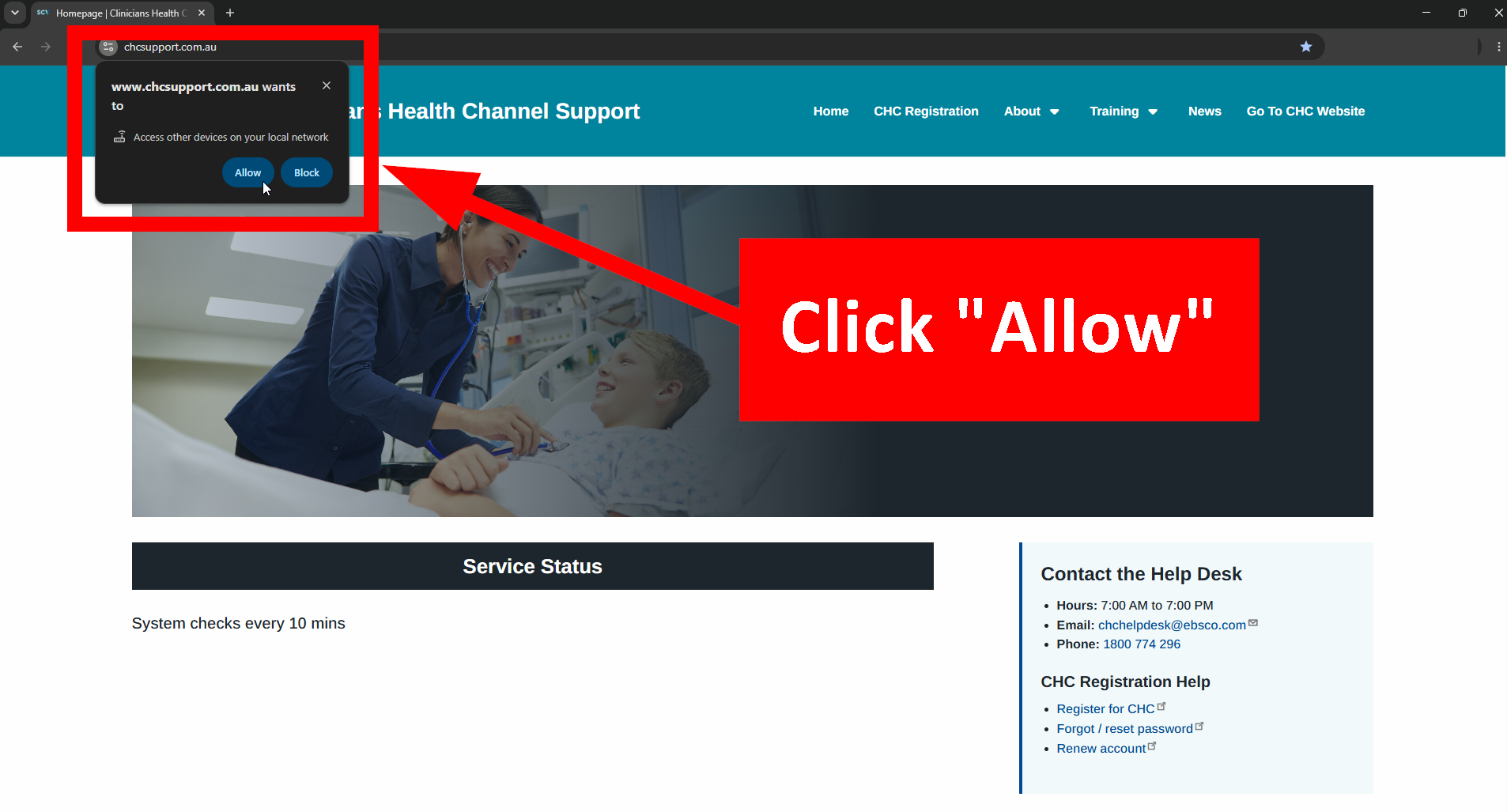
On this website a pop-up says “www .chcsupport.com.au wants to access other devices on your local network” Allow or Block. What should I do?
Please click Allow!
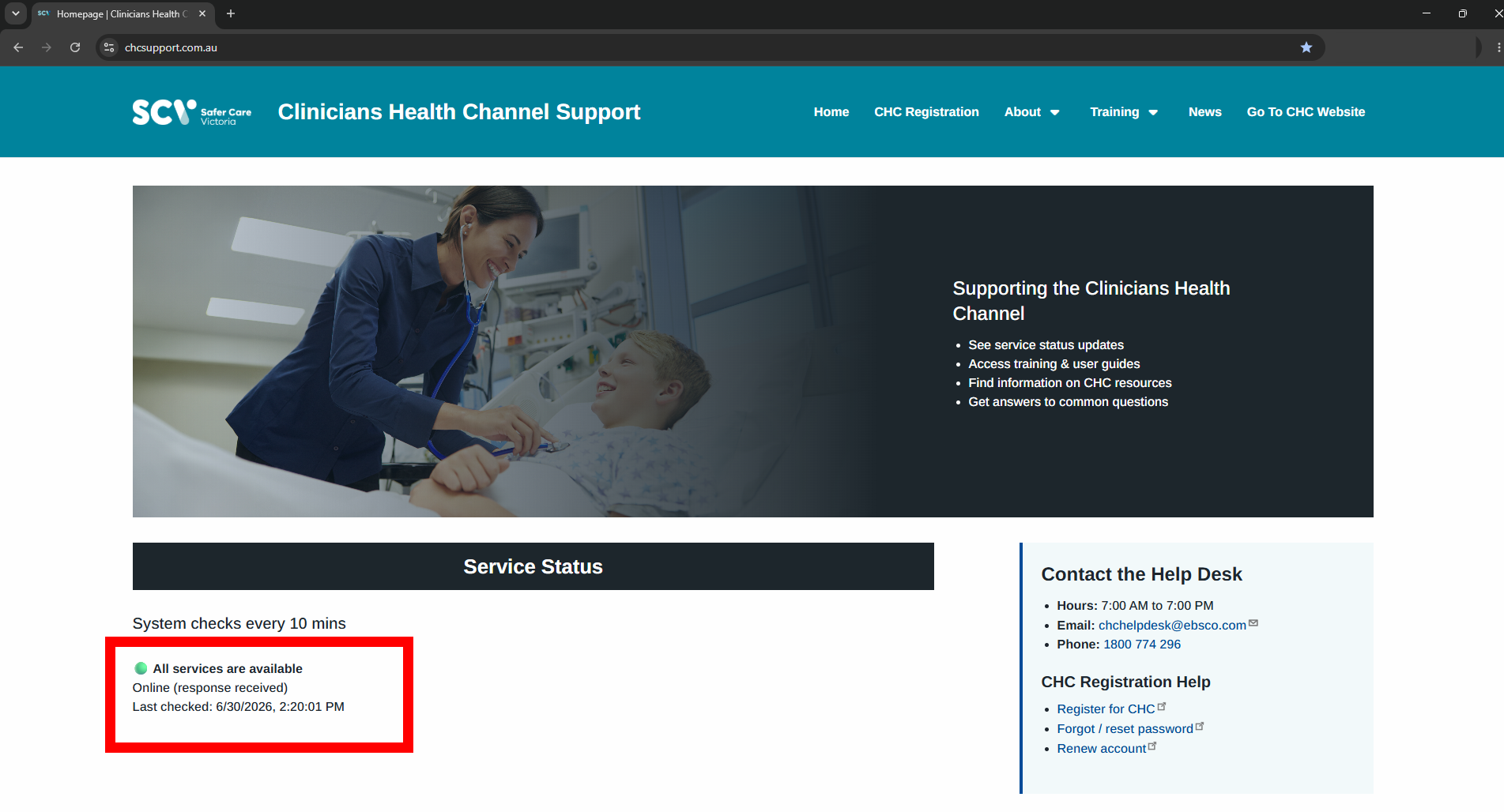
Some users may see this pop-up when they login to the CHC Support Site. This is expected behaviour and it is safe to click "Allow". In fact it is necessary to click "Allow" for the automatic Service Status mechanism to work. If you click "Block" the service status won’t be able to gather information from resource publishers, and it will show an error.
This happens because some health services may require the use of cloud-based cybersecurity platforms or VPNs, such as Zscaler, to access certain websites or website functionality. If your organisation requires this, and you are not authenticated via that cybersecurity platform, you may see this pop-up. Please ensure that you are logged into your organisations authenication services. This may also be dependent on your browser settings.
If you have any problems please contact the CHC Help Desk:
- Email: chchelpdesk@ebsco.com
- Phone: 1800 774 296
Which organisation’s staff are eligible to use CHC resources?
Included
- Victorian public hospitals (as defined by DH Vic list)
- Community health services (defined by DH Vic list)
- Aboriginal community controlled health organisations
- Urgent Care Clinics
- State funded services (e.g. Ambulance Victoria, Emergency Services, AOD Services)
- Victorian Public Service staff
Excluded
- Private funded health services
- Private practice clinicians
- Health Professionals funded through the Medicare Benefits Schedule
- Primary Health Networks
- Federally funded services
Can I access CHC resources through my Health Service’s library?
If you are employed at one of the locations below, you can access CHC resources and additional research resources through your Health Service’s medical library.
| Health Service | Library Website | Register |
| Austin Health | Visit the library | |
| Bairnsdale Regional Health Service | Visit the library | Register here |
| Barwon Health | Visit the library | Register here |
| Bayside Health - Alfred Health | Visit the library | Register here |
| Bayside Health - Peninsula Health | Visit the library | Register here |
| Bendigo Health | Visit the library | Register here |
| Central Gippsland Health | Visit the library | Register here |
| Goulburn Valley Health | Visit the library | Register here |
| Grampians Health | Visit the library | Register here |
| Latrobe Regional Health | Visit the library | |
| Mercy Health (Mercy Hospital for Women, Heidelberg) | Visit the library | |
| Mercy Health (Werribee Mercy Hospital) | Visit the library | |
| Monash Health | Visit the library | |
| Northeast Health Wangaratta Library | Visit the library | Register here |
| Northern Health | Visit the library | Register here |
| Royal Children's Hospital | Visit the library | Register here |
| Royal Melbourne Hospital | Visit the library | |
| Royal Victorian Eye and Ear Hospital | Visit the library | Register here |
| Royal Women's Hospital | Visit the library | |
| St Vincent's Hospital, Melbourne | Visit the library | |
| Western Health | Visit the library | Register here |
What does CHC Registration mean?
CHC Registration provides a secure, single sign on service giving you offsite access to CHC’s online resources such as clinical decision support tools, drug databases and medical journals. CHC is using access management technology called OpenAthens. OpenAthens is a secure access management solution that helps people around the world access digital content using single sign-on. It is used by large health, government, education and corporate organisations worldwide.
Instead of needing separate usernames and passwords for each resource, you log in once with your CHC OpenAthens credentials, which verifies you and gives permission to access all of CHC’s subscribed content. Registering for CHC gives you:
- Access all CHC resources using one username and password
- Use resources from any device with an internet browser
- Work offsite (e.g. from home or remote locations)
- Use your mobile device both on-site and offsite
- Receive CHC monthly newsletters covering upcoming training sessions, website and resource updates, and topical research information (optional)
In short, Registering for CHC (powered by OpenAthens) makes it easy to access CHC resources anytime, anywhere, without multiple logins.
What does “Offsite user” mean? Are “Offsite” users able to access CHC resources?
“Offsite” means you are working outside an approved health network. This includes working from home, working remotely, or using a personal or mobile device rather than a networked computer within a health service organisation..
If you are offsite, you won’t have immediate access to CHC resources. However, you may be able to log into CHC resources by registering for CHC (via OpenAthens). Register for offsite access here.
You are entitled to offsite access if you are working in one of the approved health network organisations, public service, Aboriginal health services, community health services OR other state funded health organisations.
Approved Health Networks
The approved health network includes all network computers/devices in:
- All Victorian Public hospitals in Local Health Service Networks
- Department of Health administration (including Safer Care Victoria)
- Ambulance Victoria
- Forensicare
- Queen Elizabeth Centre
- Tweddle Health Service
If you are working onsite within an approved health network organisation and using a network-connected device, you will not need to log in to access CHC resources. Access is automatically provided via IP address recognition, which enables all users on the network to use CHC resources without needing an individual login.
How do I register for offsite access? Am I eligible?
CHC Registration is easy. Just fill out the registration form and follow the simple instructions. If you are having trouble follow this guide for first time users.
Access to CHC resources is open to eligible users and organisations in Victoria. The list of eligible locations is shown on the registration form. If your organisation or location is not listed, and you believe it should be, please email chchelpdesk@ebsco.com.
Can I register for CHC using my personal email address?
Yes. However to register using a personal email address, you must complete the registration process using a computer on your health service’s network. To register, follow the instructions on this registration form.
I tried to register but I was unsuccessful. What should I do?
Please contact the CHC HelpDesk chchelpdesk@ebsco.com from your work email address with answers to the following questions:
- Have you completed all sections of the form and accepted the terms and conditions?
- Have you registered using an email address provided to you by your Health Service or organisation?
- Or if you are using a personal email address, are you completing the registration process using a computer on your Health Service’s network?
- Have you selected the correct Health Service or organisation?
How often will I have to renew my CHC registration? How does that work?
Most CHC registrations (powered by OpenAthens) run for 12 months, unless you registered your account as a temporary employee with a set contract, placement, rotation or secondment expiry date.
When your account is due to expire, we will send you an email to renew your account. Just follow the steps in that email which will guide you through the simple renewal process. You will receive a confirmation email at the end of the process.
NOTE: Users from St. Vincent’s Health public hospital do not need to register or renew their account. Your account is the same as your internal user directory, used to access internal applications. Access is controlled by your IT department.
I have received an email saying that my CHC registration is due to expire and needs to be renewed.
What should I do?
You have 3 months from the date the email was sent to renew your account. Please note, accounts that have expired for over 3 months will be automatically deleted from the system.
- Follow the renewal link provided to you in the renewal email. If you have any problems following the link please copy and paste the URL into your browser. You will be prompted to enter your CHC OpenAthens username and password to begin the renewal process.
- Note: If you have registered with a personal email address, e.g. Hotmail, Gmail etc, please ensure you are onsite using a computer connected to your Health service or organisation network to complete the renewal process.
- Once you have logged in, your details will be auto-populated into the renewal form.
- If your details remain unchanged you click the SUBMIT link located at the top of the page.
- You can also use this as an opportunity to review your account information and update your details where necessary. (eg. update your registered Health Service or email address etc).
- Once you have submitted the renewal form, you will be required to re-activate your account and update your password. A link will be sent to your email. Your access will be extended for an additional 12 months or until the date your temporary contract, placement, rotation or secondment ends.
I have completed the registration renewal process, but I have not received my confirmation email?
Has my account been renewed successfully?
If you did not receive an email, and you’re unable to access CHC resources, your account may be inactive. Please check your spam/trash folder in your inbox for your activation email. If you are concerned that your account has not been renewed successfully, please email chchelpdesk@ebsco.com providing your CHC OpenAthens username and registered email address.
I have forgotten my CHC registration username / password.
Forgotten Username
If you have forgotten your username, please contact the CHC HelpDesk chchelpdesk@ebsco.com
Forgotten Password
To reset your password you must enter your enter your registered CHC (OpenAthens) username, e.g., chcjcitizen1. Do net enter your email address, even though the text says "Email address or username". You will then be sent an email with a link to reset your password. You can also find the link in the Contact the Help Desk information on very page of this website.
If you have any problems please contact the CHC HelpDesk chchelpdesk@ebsco.com
I have tried to login using my CHC account details but it says my account has expired.
What should I do?
Have you received an account renewal email? If your account has only recently expired (within 3 months) and you remember your login details, you can still renew your account.
If your account has expired and you cannot remember your details, or you need help with this process, please contact the CHC HelpDesk www.chcsupport.com.au and provide:
- Your current Health Service or organisation
- Your position title
- Your primary contact number
What are the CHC registration (powered by OpenAthens) password requirements?
Strong passwords are required to ensure the safety of user accounts. Compliant passwords are required to meet the following criteria:
- A minimum password length of 10 characters is required.
- OpenAthens recommends using a 'pass-phrase' of three random words for maximum security, e.g. “correct horse battery”. Note: DO NOT use that example passphrase.
- Passwords/phrases may use spaces between words but this is not required.
- Uppercase letters, numbers and special characters may be used but are not required.
- Read more about passwords in the OpenAthens knowledgebase.
CHC Resources
I am trying to access a CHC resource, but the page won't load or I get an error message.
If you are experiencing problems accessing a resource, please contact the CHC HelpDesk chchelpdesk@ebsco.com and provide answers to the following questions:
- What is the name of the resource that you are having problems with?
- When did the problem start (e.g. date and approximate time)?
- Are you trying to access the resource while onsite (at work) or offsite (using an OpenAthens account to login)?
- Is this problem affecting one computer or a whole department?
- Have you been able to access this resource in the past?
- Have you cleared your cookies cache and recent browsing history and re-attempted access?
- Please provide a "Print Screen" copy of the error message you are viewing to be pasted into the email.
- If you saw an error in EBSCO Discovery Service, please copy the address bar of the search result OR item with the problem.
Instructions on how to "Print Screen"
- Go to the webpage displaying the error and maximise it.
- Press the "Print Scrn" key on your keyboard which is usually located on the top right of your keyboard next to the F12 key.
- Open a new email/reply email and once you have finished typing your response, position the cursor where you would like to paste the "Screen Print", then press "Ctrl V" on your keyboard.
We may also request additional information to assist with your query, as listed below:
- Your domain name: (You may need help from your IT department).
- Your IP address: (you can check this using https://whatismyipaddress.com/).
- The username and password of the account/s that are having this problem.
Does CHC provide access to UpToDate?
No, CHC does not provide access to Up To Date (UTD). CHC offers clinicians with world-class Clinical Decision Support tools, including DynaMed and Isabel, and BMJ Best Practice. Clinicians are encouraged to become familiar with and consult a range of tools. If you are unfamiliar with CHC's Clinical Decision Support tools, please refer to the summaries below:
DynaMed
- DynaMed provides high-quality evidence-based recommendations for patient management and guidance from leading experts, with clinically-organised topics, presented in an easy-to-use bullet point format.
- Evidence is synthesised through a systematic literature surveillance process with content continuously updated whenever new information indicates a need for change in practice.
- Content includes comprehensive reviews of diseases, conditions and abnormal findings, drug and laboratory monographs, calculators, CPD tracking, and highly-focused topics on evaluation and management.
- Includes links to Queensland Clinical Guidelines, the Primary Care Clinical Manual (PCCM), the Chronic Conditions Manual (CCM), and guidelines from national bodies including the Australian Resuscitation Council and Choosing Wisely Australia.
- Integrates with the Isabel diagnosis checklist tool to help clinicians broaden their differential diagnosis
Isabel
- Isabel is a symptoms-based diagnosis checklist tool for constructing or broadening a differential diagnosis, and recognising a disease, at the point of care.
- Isabel includes more than 6,000 disease presentations by multiple signs and symptoms.
- The tool uses the patient's demographics and clinical features to produce a list of possible diagnoses, including time-sensitive "Don't Miss Diagnoses”.
- Isabel is fully integrated with DynaMed, with results linking directly to relevant DynaMed topics.
BMJ Best Practice
- BMJ Best Practice presents systematic reviews incorporated with expert opinion and guidelines, to help provide a “second opinion” without the need for checking multiple resources.
- It draws on the latest evidence-based research, guidelines and expert opinion to provide patient-focused guidance on diagnosis, prognosis, treatment and prevention.
- Content is updated daily with clinical expertise from more than 1,600 international authors and 2,500 peer reviewers.
- A Comorbodities Tool offers guidance on the treatment of acute conditions alongside pre-existing comorbidities, and generates a holistic management plan tailored to the unique needs of each patient.
- Includes step-by-step guidance using treatment algorithm tables, clinical guidelines, prescription guidance using linked drug databases, calculators, automatic CPD tracking, how-to videos and patient information.
Does the CHC website have its own mobile app?
No, the CHC website does not have a mobile app, however the website is mobile-optimised, using responsive design to automatically resize and rearrange content to provide an optimal viewing experience across any mobile device.
Does the CHC offer resources with mobile apps?
Yes, the CHC provides access to a range of mobile-optimised resources, as well as several resources that have their own mobile apps for Apple and Android devices. See the full list with installation and access instructions on the Apps page.
To use mobile apps, you need to register for an OpenAthens account. Your OpenAthens account also gives you 24x7 offsite access, when working from home or in remote locations.
Why are the latest editions of some journals unavailable? (Embargo)
Embargoes exist for the purpose of preserving a publisher’s traditional print and electronic journal subscription. The length of an embargo is determined by the publisher and can last anywhere from three to eighteen months. Access to medical titles which are contained within large, aggregated databases are sometimes embargoed as per publisher agreements. While EBSCO works together with publishers to provide as much non-embargoed content as possible, it is a reality that some titles will be released in full-text to databases such as MEDLINE and CINAHL Ultimate some months after their initial publication.
Can I export citations from CHC’s databases to citations tools like EndNote?
Yes, citations can be exported from search results CHC’s discovery, or from searches conducted within databases on the EBSCOhost platform, e.g. CINAHL Ultimate and APA PsycINFO. Citations can be exported as direct exports to, or RIS files for common citation tools such as EndNote RIS, BibTex, Citavi RIS, Mendeley, RefWorks, Universal RIS and Zotero, as well as in other formats such as XML, CSV, MARC21, BibTex etc., depending on the exporting database.
Can I export the full text or PDFs from CHC’s databases to citations tools like EndNote?
No. While citations can be exported, publisher licensing restrictions prevent CHC from allowing full text / PDFs to be exported to, or displayed within, citation tools such as EndNote RIS, BibTex, Citavi RIS, Mendeley, RefWorks, Universal RIS and Zotero.
Accessibility
Is this website accessible for people with disabilities?
Yes, we are committed to ensuring that people with disabilities can access this site and its information and continue to review and improve the accessibility of the site.
This website is both WCAG AA and WCAG AAA compliant. Every effort has been made to ensure that this website maintains these accessibility standards according to the World Wide Web Consortium (W3C).
We welcome your feedback about the website. If some parts of this site do not meet your specific accessibility needs, we can give you the information in an alternative format. Please email the CHC Help Desk at chchelpdesk@ebsco.com and tell us what information you want, including the web address (URL).