
BMJ Best Practice
Downloading the app is quick and easy and it takes up minimal storage on your device.
BMJ Best Practice App Instructions
Key Features
- Offline access, which allows you to view content anywhere, any time, without relying on an Internet connection
- Fast navigation through an intuitive interface and search function
- More than 250 interactive medical calculators
- Over 500 patient leaflets
- A browse bar for quick access to Important Updates, specialties and more
- Topics broken down into clear sections including prevention, diagnosis and management
- Procedural videos and images included for relevant conditions
- Automatic tracking of your activity for CPD purposes
DynaMed
The DynaMed mobile app provides easy access to clinical information on your Apple or Android device. The mobile app provides enhanced search, offline access, fast content download, silent updates, easy navigation and seamless authentication. Clinicians can take advantage of mobile access to DynaMed and continue work without missing a beat, thanks to syncing between the desktop and mobile experiences.
Key Features
- Search shortcuts
- Quick access to relevant and saved content
- Access content offline
- Bookmark favourites
- Write and save notes about particular topics
- Email topics
How to install the DynaMed app
Step 1: Access DynaMed through the CHC website and set up a personal user account. Click here for instructions.
Step 2: Once you have a personal account, search for DynaMed in your mobile app store of choice, download the mobile app and begin using it with your new personal user credentials.
EBSCO Mobile App
The EBSCO Mobile app is a convenient and user-friendly tool designed to provide seamless access to a vast collection of clinical resources on the go. Tailored for healthcare professionals and researchers, the app allows you to search, read, and download journal articles, and evidence-based content directly from your mobile devices. With features such as offline reading, personalised folders, and intuitive navigation, EBSCO Mobile supports efficient information retrieval in fast-paced environments, making it particularly valuable for clinicians who need reliable and current information at the point of care.
Download
- For Android Devices – Search for the EBSCO Mobile app on the Google Play Store
- For Apple Devices – Search for the EBSCO Mobile app on the Apple Store
User Guides
- EBSCO Mobile App – Quick Start Guide
- EBSCO Mobile app – Tutorial (YouTube 4:18 mins)
- EBSCO Mobile App - Getting Started Guide (PDF)
Find Your Organisation
To use EBSCO Mobile you will need to find your organisation. Within the app you can search for your Health Service name (if listed below), otherwise search for "Clincians Health Channel".
- Albury Wodonga Health
- Austin Health Sciences Library (users from Mercy Hospital for Women can also search for Austin Health)
- Barwon Health
- Bayside Health (Alfred Health)
- Bendigo Health
- Central Gippsland Health
- Eastern Health
- Goulburn Valley Health
- Grampians Health
- Latrobe Regional Health
- Monash Health
- Northeast Health Wangaratta Library
- Northern Health
- Peninsula Health
- Royal Children's Hospital
- Royal Melbourne Hospital (users from Royal Women’s Hospital should search for Royal Melbourne Hospital)
- Royal Victorian Eye and Ear Hospital
- South West Healthcare
- St Vincent's Hospital, Melbourne
- Werribee Mercy Hospital
- Western Health
If you are not a member of one of these Health Services, search for Clinicians Health Channel.
eMIMSelite
The eMIMSelite app contains a comprehensive list of Australian approved medicines, with many of the MIMS online features you are already familiar with such as:
- Abbreviated product information: Provides concise summaries of key information and allows users to quickly check dosage, pack, use, indications, contraindications, precautions and comprehensive PBS information.
- Full product information: Provides the complete TGA-approved product information document that includes comprehensive information on all aspects of the medication.
- Drug interactions: Enables you to check for drug-drug interactions sourced from international primary and tertiary literature using one of MIMS' evidence-based decision support tools.
- Pill Identifier: Thousands of pill images, searchable via shape, colour, therapeutic class etc.
Key Features
- Available on Apple and Android devices.
- Users can access content via the eMIMSelite app on when offline or in flight mode - see the installation guide.
- The app is light and fast, giving a better user experience.
- The design of the interface aligns with the browser version, making it more intuitive to use, and easier to find information and navigate across modules.
To Download the eMIMSelite App
Step 1. For Android Devices – Search for eMIMSelite on the Google Play Store.
Step 2. For Apple Devices – Search for eMIMSelite on the Apple Store.
To Request Mobile Tokens (to login to the eMIMSelite mobile app)
Step 1. Login to the browser version of eMIMSelite via the CHC website.
Step 2. Click on the ‘three-line’ icon on the top right of the main menu.
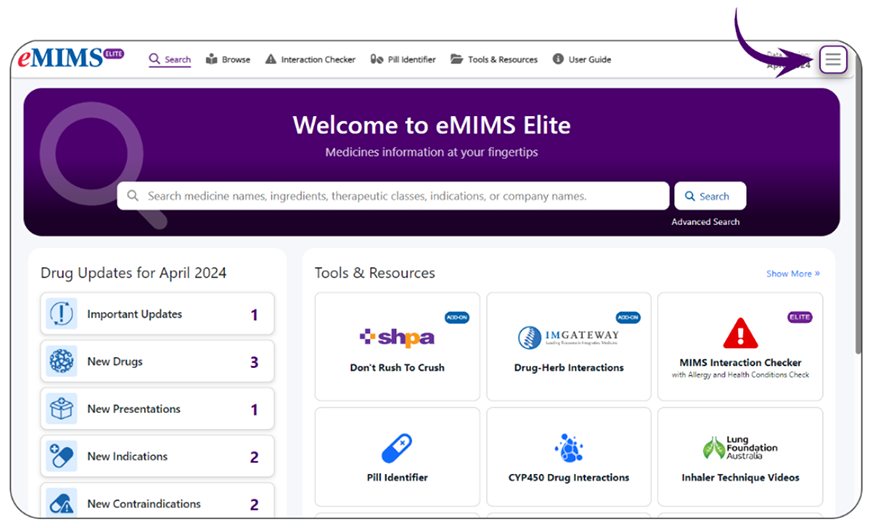
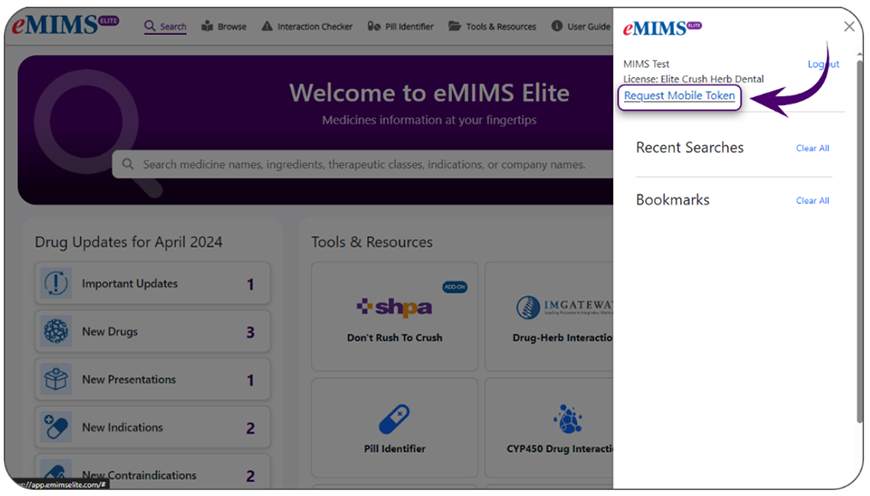
Step 3. Click on the ‘Request Mobile Token’ option.
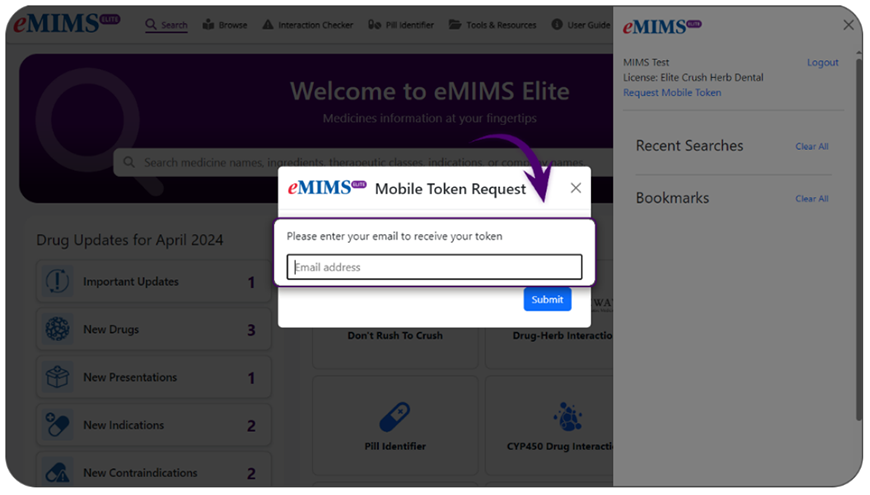
Step 4. Submit your email address, and you will be emailed your new app token.
Step 5. Log in to the eMIMSelite mobile app by entering the token in the app.
Micromedex
The Merative Micromedex suite is a current, reliable, and robust solution to support informed clinical decisions with fast access to the latest evidence-based insights at the point of care. The impartial clinical content is updated daily and vetted through an accredited review process. The Merative Micromedex mobile app delivers evidence-based clinical insights directly to healthcare professionals at the point of care, including Drug Reference summary, NeoFax and Pediatric reference, IV Compatibility, and Drug Interactions information along with a set of clinical calculators.
Key Features
- Unified Access: Access to all essential drug information from a single, comprehensive app.
- Ease of Navigation: User-friendly interface for easy access to information.
- Ease of Maintenance: Experience automated content updates so you can stay focused on your workflow.
Installation Instructions
- Micromedex App Installation Instruction (Video 2:29 mins)
- Mobile App User Guide (PDF 2.67MB)
- Micromedex Mobile iOS User Reference Guide (PDF 4.73MB)
- Micromedex Mobile Android User Reference Guide (PDF 3.78MB)
Step 1. Install the Micromedex App on your phone via Google Play and the Apple App Store.
Step 2. Once installed, open the app and you will find your activation code on your mobile.
Step 3. The activation code will generate on the mobile device. Copy the code by tapping on a copy icon to the right of the code. To activate the app:
a. Tap on "Activate Now" button on your app. Enter login information if required.
OR
b. Follow the OpenAthens link to activate new mobile app via Micromedex online activation page.
Step 4. Paste or enter the code in the "Activate Now" window on the mobile device or in the desktop application. Click "Activate Device".
NSW Trauma App
The NSW Trauma App will ensure clinicians are supported in the care of the trauma patient and are able to manage to meet the needs of the specific traumatically injured patient. Clinicians in metropolitan, rural and remote areas require standardised, easy access to clinical support tools and up-to-date, evidence-based information to deliver optimal care. This includes the provision of trauma resources for pre-hospital and intra-hospital clinicians. All clinicians require portable and versatile amenity in trauma care that can be used on a smart phone or tablet operable in environments such as poor cellular or WiFi access locations.
Installation Instructions
Royal Children's Hospital - Clinical Practice Guidelines
This Clinical Practice Guidelines app provides quality, current health information to assist clinicians providing health care to children and young people.
Installation Instructions
Therapeutic Guidelines
Key Features
- Browse over 2,500 clinical topics covering common areas of care, arranged by clinical problem
- Use the drug index to quickly find over 3,500 drug recommendations and indications
- Link from drug recommendations to Pharmaceutical Benefits Scheme details, including product and consumer medicine information
- Link from drug recommendations to pregnancy and breastfeeding information
- Fast search engine and topic retrieval
- Refine and save search results
- Log in only once – the first time the app is opened
- Easily work offline – by selecting the cloud icon to download content
- Printable patient information sheets and downloadable PDFs
- A wide range of useful tables, boxes and figures
- “What’s New” information in each update
- Time-saving calculators for body surface area, creatinine clearance and body weight, and glomerular filtration rate for children
Installation Instructions