
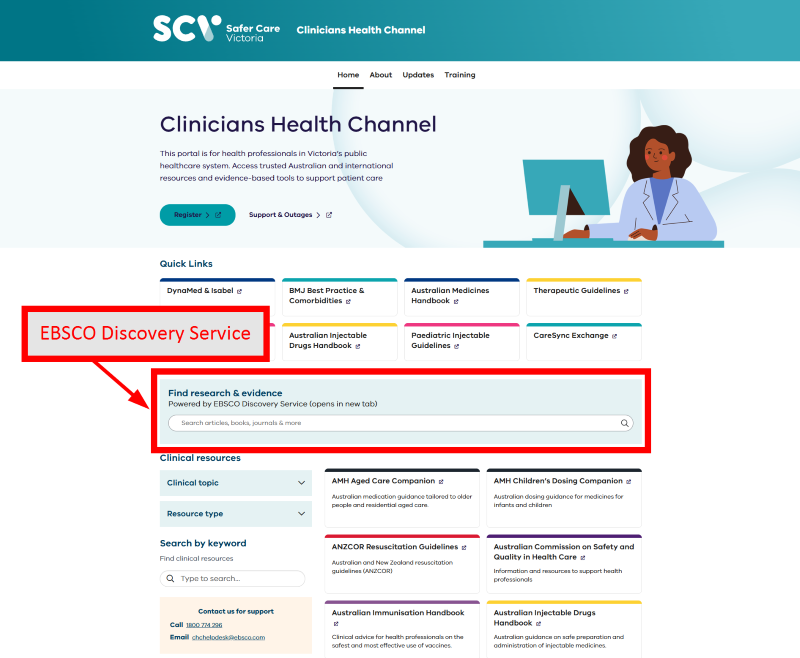
EBSCO Discovery Service (EDS) is the Clinicians Health Channel's primary discovery and search platform, providing a single search interface to access content from CHC's subscribed databases and journals. Rather than searching individual databases separately, EDS helps clinicians, researchers, and educators to search across multiple resources simultaneously from one location.
EDS is designed to support evidence-based practice by providing fast, comprehensive access to high-quality health and medical literature. Powerful search tools and filters allow users to refine results by publication type, subject, date, full text availability and other criteria, making it easier to identify the most relevant information for clinical decision-making, research, and education.
Key Features
- Single Search Across Multiple Resources - Search across CHC's subscribed databases, journals, eBooks and other available content from a single search box, eliminating the need to search individual platforms separately.
- Advanced Search Options - Conduct simple or sophisticated searches using Boolean operators, phrase searching, field codes, search history and advanced search functionality to support structured literature searching.
- Filters and Refinement Tools - Narrow search results using filters and facets such as publication date, subject, source type, peer-reviewed status and full text availability.
- Full Text Finder - Locate and browse journals available through CHC subscriptions using Full Text Finder. Users can search for specific journal titles, browse publications alphabetically, and identify available full text holdings across participating resources.
- Personal Research Tools - Create a personal MyEBSCO account to save searches, organise references into projects, set up journal and search alerts, and manage ongoing research activities.
- Citation and Export Tools - Generate citations and export references to citation management software. Users can also bookmark, print, download and share articles and other resources.
- Accessibility Features - EDS includes accessibility tools such as article translation, interface language options and text-to-speech functionality to support a wide range of user needs.
Who Should Use This Resource?
EBSCO Discovery Service is suitable for all Clinicians Health Channel users, including:
- Medical practitioners
- Nurses and midwives
- Allied health professionals
- Researchers Librarians and information professionals
- Health service managers and policy staff
EDS is particularly useful when starting a literature search, exploring a clinical topic, locating known articles, or searching across multiple resources at once.
Getting Started
Enter keywords, clinical questions, author names or article titles into the search box to retrieve results from across the CHC collection. Results can then be refined using filters or advanced search options to identify the most relevant evidence and information. Users undertaking comprehensive literature searches can take advantage of advanced search features, search history and saved searches to support their research process
User Guides
A range of tutorials, quick start guides, FAQs and training resources are available through EBSCO’s knowledge centre, EBSCO Connect.
- EBSCO Discovery Service - Intro Guide (PDF 1.5 MB)
- An Introduction to EBSCO Discovery Service (Video tutorial 8:45 minutes)
- EBSCO Discovery Service Overview for the Researcher (Video tutorial 24:19 minutes)
- What is EBSCO Discovery Service? (E-Learning Course 24:00 minutes)
- New EBSCO Discovery Service - Quick Start Guide (User Guide)
- The New EBSCO Discovery Service - Frequently Asked Questions (User Guide)
- EBSCO Discovery Service - Performing a Basic Search on the New EBSCO User Interfaces (Video tutorial 4:00 minutes)
- Creating Search Alerts (Video tutorial 2:25 minutes)
- Log in to post comments